Edge Installation Instructions

Install Instructions for your Free Trial of Budget Plus+

These instructions are for Microsoft Edge.

Total Time to install Under 3 minutes. Trial version is the Full version.

Scroll down for instructions

Step 1 – Download the Budget+ Installer

Click here to download the Budget+ installer

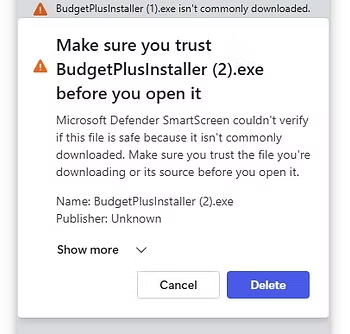
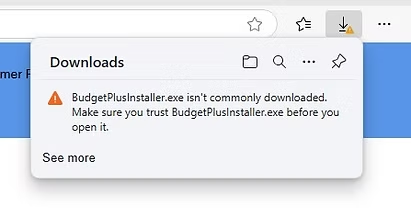
If you get a message saying the download is suspicious, please click on the message and allow the download to complete. The process is perfectly safe.

Step 2 – Run the Budget+ Installer

Click on the 3 dots and select ‘Keep’

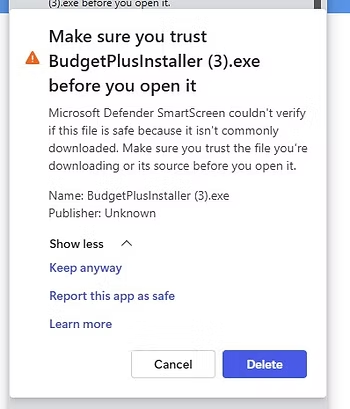
Click on the ‘Show more’.

Click on ‘Keep anyway’.

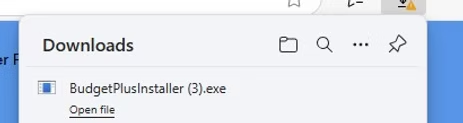
Click on ‘Budget Plus+ Installer’.

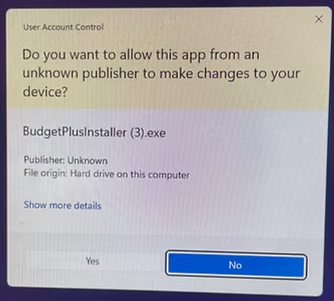
Click on ‘Yes’.

Step 3 – Allow Installer to complete, accepting all prompts and answering any questions.

Step 4 – On completion of the installer the Budget Plus+ Log On screen will be displayed.

If you have an account, enter your username and log on in the normal way.

If you are new to the system, select ‘New User’ followed by Return, and enter the requested details to create your account.

Congratulations. You are now ready to control your personal finance the easy way.

Thank you for choosing Budget Plus+.
Scroll to Top